

You have installed Cheat Engine. You have opened it.
You are now staring at empty tables, hexadecimal addresses, dropdown menus, and a logo that looks like it was designed for a heavy-metal cybersecurity convention.
Naturally, your first question is:
Which button gives me unlimited money?
Unfortunately, Cheat Engine does not have a universal Become Rich button. It is a memory scanner, which means you must first locate the value you want to change inside a running program.
The basic process is simple:
- Attach Cheat Engine to a program.
- Search for a visible value.
- Change that value inside the program.
- Search again using the new value.
- Repeat until only a few possible addresses remain.
- Test and modify the correct address.
In this guide, we will use Cheat Engine’s included tutorial program rather than a commercial game.
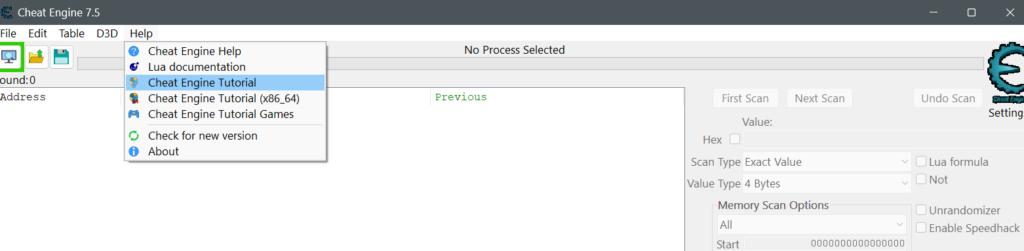
That gives us a safe environment where nothing important can be corrupted, no multiplayer account can be banned, and no innocent NPC has to suffer because you accidentally changed gravity to 9000.
Before You Start: Keep It Offline
Cheat Engine is best learned through:
- Its included tutorial
- Offline single-player games
- Small programs you created yourself
- Software that explicitly permits modification
Avoid using it with online games, competitive multiplayer titles, shared economies, or anything protected by anti-cheat software.
Changing health in your own offline game affects you.
Changing the outcome of a ranked match affects several strangers who merely wanted to relax after work and are now reconsidering humanity.
You should also back up any save files before experimenting with a real game. Health and money are usually straightforward. Quest progression is a nest of flags, dependencies, and developers confidently assuming nobody will ever set Chapter 2 to 47.
Also read: What Is Cheat Engine, and How Does It Actually Work?
The Only Parts of the Interface You Need Right Now
Cheat Engine contains many advanced tools, but beginners only need a few controls.
Process Button
The computer-shaped button near the upper-left corner lets you select a running program.
Cheat Engine must attach to the correct process before it can scan anything useful.
Value Box
This is where you enter the number you want to find, such as:
100health25ammunition4500gold3potions
Scan Type
For the first exercise, use Exact Value.
Later, you will also use options such as:
- Unknown Initial Value
- Increased Value
- Decreased Value
- Unchanged Value
Value Type
For visible whole numbers, begin with 4 Bytes. It is not always correct, but it is the standard first guess for health, money, ammunition, scores, and inventory quantities.
The two important scan buttons are:
- First Scan: starts a new search
- Next Scan: filters the previous results after the value changes
That is enough to begin. The other buttons can remain mysterious for a few more minutes.
Your First Scan: Finding a Visible Health Value
Open Cheat Engine’s tutorial program and leave it running beside Cheat Engine.
The tutorial contains several stages that teach increasingly advanced concepts. For now, we only need the early section involving a visible health value.
Attach Cheat Engine to the Tutorial
Click the process button and select the tutorial process, usually named something similar to:
Tutorial.exe
Once selected, its name should appear near the top of Cheat Engine.
Always confirm that you attached to the correct process. Scanning the wrong application may produce thousands of results and absolutely no progress.
You might successfully change the width of a button in Discord, which is technically impressive but strategically useless.
Search for the Current Health
Suppose the tutorial displays:
Health: 100
In Cheat Engine, choose:
- Scan Type: Exact Value
- Value Type: 4 Bytes
- Value:
100
Click First Scan. Cheat Engine will probably find many addresses containing 100.
That is normal. The number might represent health, a window coordinate, a percentage, a timer, or any number of unrelated things. Cheat Engine does not yet know which 100 matters.
Change the Health and Filter the Results
Return to the tutorial and press the button that reduces your health.
Suppose it changes from:
100
to:
96
Return to Cheat Engine, enter 96, and click Next Scan. Do not click First Scan again. First Scan starts over. Next Scan filters the results you already found.
Reduce the health again. If it becomes 91, enter 91 and click Next Scan.
Repeat until only one or a few addresses remain.
The logic is straightforward:
- Thousands of memory locations may contain
100. - Far fewer will change from
100to96. - Almost none will then change from
96to91at exactly the same moments.
The correct address behaves like the value you are tracking. The unrelated addresses gradually expose themselves as innocent bystanders.
Add and Modify the Address
Double-click the most likely result to add it to the lower address list. Its value should match the health shown in the tutorial.
Double-click that value and replace it with the number requested by the tutorial, perhaps 1000.
Return to the tutorial.
If the health changes or the tutorial confirms the step, congratulations: you have modified the live memory of a running program.
No green code descended across the screen. No government agency called. Your hoodie did not automatically become more mysterious.
You changed one integer. But that integer demonstrates the central idea behind Cheat Engine.
What Just Happened?
The tutorial stored its health value somewhere in memory. Cheat Engine found the address by observing how the value changed.
When you entered a new number, Cheat Engine wrote that number into the same location.
The simplified sequence looks like this:
Tutorial stores 91 → Cheat Engine writes 1000 → Tutorial reads 1000
Cheat Engine did not need to understand the tutorial’s graphics, rules, or emotional backstory. It only needed to find the correct data.
Freezing a Value
Once an address is in the lower list, you can usually freeze it by ticking the checkbox beside it. Set the health to a suitable number and freeze the address.
When the tutorial tries to reduce the value, Cheat Engine repeatedly restores the frozen number.
Conceptually:
Tutorial writes 95 → Cheat Engine restores 100
Tutorial writes 90 → Cheat Engine restores 100
Tutorial begins questioning the nature of free will
Freezing is commonly used for:
- Health
- Ammunition
- Timers
- Resources
- Movement speed
- Coordinates
However, not every value should be frozen. Some game systems expect values to change. Freezing the wrong address can break animations, missions, physics, or menus.
A frozen countdown might stop a mission timer.
It might also leave every NPC permanently waiting for an event that now exists outside time.
Finding a Value You Cannot See
Exact-value scanning works when a game displays the number. But many games show health, stamina, or progress as a bar without revealing the actual value.
You know the bar became shorter, but you do not know whether the game stores it as:
1001.0500047.38- Something encoded
- Three raccoons maintaining a spreadsheet
In this situation, use Unknown Initial Value.
Start a new scan and choose:
- Scan Type: Unknown Initial Value
- Value Type: 4 Bytes as an initial guess
Click First Scan. Cheat Engine records a large collection of possible values because you have not supplied a specific number.
Now make the hidden value change.
If you take damage, choose Decreased Value and click Next Scan. Take damage again and repeat.
If you wait without changing the health, choose Unchanged Value.
If you heal, choose Increased Value.
A useful sequence might look like this:
- Unknown Initial Value
- Take damage
- Decreased Value
- Take damage again
- Decreased Value
- Do nothing
- Unchanged Value
- Heal
- Increased Value
Each scan removes addresses that did not behave like health. You are no longer searching for a specific number. You are searching for a pattern of behaviour.
It is basically a game of “Guess Who?” except every character is a memory address and most of them are lying.
Why Unchanged Value Matters
Suppose you take damage and scan for Decreased Value.
Many unrelated values may also have decreased:
- A timer
- An animation counter
- An enemy’s health
- A sound-buffer position
- The remaining patience of the tutorial program
Now stand still and make sure your health does not change. Scan for Unchanged Value.
Any address that continued moving can be eliminated. Then take damage again and scan for Decreased Value. Alternating between changed and unchanged conditions is one of the most effective ways to reduce a large result list.
Understanding Value Types
A visible number is not always stored in memory exactly as it appears on screen.
A game displaying 100 health might store it as:
- The integer
100 - The float
100.0 - The value
1.0, representing 100 percent - The value
10000, using an internal multiplier - A number calculated from several other values
That is why choosing the correct value type matters.
4 Bytes
The usual first choice for whole numbers such as:
- Health
- Money
- Ammunition
- Score
- Inventory quantities
- Experience points
Float
Commonly used for:
- Coordinates
- Speed
- Timers
- Percentages
- Physics
- Values involving decimal precision
For example, a game showing 75% might store it as:
0.75
Searching for 75 as a 4-byte integer would therefore find nothing useful.
Double
Similar to Float, but with greater precision.
Byte and 2 Bytes
Sometimes used for small counters, flags, or values with limited ranges.
8 Bytes
Used for larger integer ranges.
For beginner experiments, focus mainly on 4 Bytes and Float. Those two cover many ordinary gameplay values.
Testing Several Possible Addresses
Sometimes repeated scanning leaves several results. Do not change all of them to 999999.
That is the memory-editing equivalent of repairing a watch with a flamethrower.
Instead:
- Add one candidate to the address list.
- Change it slightly.
- Check what happens in the tutorial or game.
- Restore it if necessary.
- Test the next candidate.
A program may keep multiple copies of the same visible number.
One address might control:
- The displayed text
- The actual gameplay value
- A temporary cache
- The previous value
- The maximum value
- A value used only when saving
Changing the display copy may make the interface claim you have one million gold while the purchasing system continues treating you like a person with twelve coins and unrealistic ambitions.
Why a Changed Value Sometimes Returns to Normal
You find an address containing 100. You change it to 500.
A second later, it returns to 100. Several explanations are possible.
The Game Recalculates It
The value may be derived from other statistics.
For example:
Maximum health = base health + armour bonus + skill bonus
The game calculates the correct number again and overwrites your edit.
You Found a Display Copy
You changed the interface value, but the real gameplay value exists elsewhere.
Another Instruction Keeps Updating It
A timer, script, state machine, or server message may continuously restore the expected number.
The Game Rejects Invalid Values
Setting a value far beyond its normal range may cause it to be clamped, reset, or rejected.
You Found the Wrong Address
Never underestimate this possibility.
The explanation is often less glamorous than encryption, anti-tamper systems, or a developer personally trying to stop you.
Sometimes you simply found the wrong 100.
Why the Address Changes After Restarting
You find the correct health address. You close the tutorial or game. You reopen it. The address no longer works.
This is normal.
Programs often allocate memory dynamically, so the same data may appear at a different address each time they launch. A directly scanned address is therefore often temporary.
To create a reusable cheat, you may eventually need:
- A pointer
- A module-relative address
- An array-of-byte pattern
- A code-injection script
- The instruction that accesses the value
Those are more advanced subjects.
For now, remember:
The value may still exist, but it has moved into a new apartment without leaving a forwarding address.
Saving Your Results as a Cheat Table
Addresses in the lower list can be saved as a Cheat Engine table, usually using the .CT file format.
A table may contain:
- Address descriptions
- Value types
- Direct addresses
- Pointers
- Scripts
- Hotkeys
- Grouped records
Choose File, then Save As, and give the table a sensible name.
Do not call it:
test final new 2 working maybe
Your future self deserves better.
Also rename individual entries clearly:
- Player Health
- Current Gold
- Magazine Ammo
- Mission Timer
A direct address may stop working after restarting the game, but saving tables is still useful for organising experiments. More durable tables generally use pointers, module offsets, byte patterns, or scripts.
Common Beginner Mistakes
Attaching to the Wrong Process
Some games use separate launchers, game executables, crash reporters, and anti-cheat processes.
The launcher may display the game’s logo while containing none of the actual gameplay values.
Always attach to the process running the game itself.
Repeating First Scan
Use First Scan only at the beginning of a search. After the value changes, use Next Scan.
Otherwise, you restart the investigation every time a new clue appears.
Sherlock Holmes would struggle if he erased the evidence board after every interview.
Choosing the Wrong Value Type
Start with:
- 4 Bytes for visible whole numbers
- Float for decimals, percentages, coordinates, speed, or timers
- Unknown Initial Value when the number is hidden
A number shown as an integer may still be stored as a float. The interface is presentation. Memory is where the strange decisions live.
Using Extreme Numbers
Avoid immediately setting values to something absurd such as:
999999999999999999
The program may overflow, crash, clamp the value, or corrupt related data. Use modest test values.
If health is normally 100, try 150 or 250.
You do not need to become mathematically immortal during the first experiment.
Editing Too Many Addresses at Once
Test one result at a time.
Changing twenty addresses simultaneously may produce an effect, but you will not know which one caused it.
You have proven that one of twenty switches controls the light by flipping the entire fuse box. Science applauds politely.
Using Cheat Engine with Online Games
Do not attach Cheat Engine to competitive or anti-cheat-protected games.
Even leaving a memory editor open while launching protected software may create account risk.
The safest environment remains Cheat Engine’s tutorial or an offline single-player game.
Quick Troubleshooting
“I Found Zero Results”
Check:
- Whether you selected the correct process
- Whether the value changed before the scan
- Whether the value type is correct
- Whether the displayed value differs from the stored value
Try a new scan using Float or Unknown Initial Value.
“I Still Have Thousands of Results”
Change the target again and perform another Next Scan.
Use Unchanged Value when the target remains stable.
Do not stare at the result list and wait for the correct address to confess.
Keep filtering.
“The Value Changes in Cheat Engine but Not in the Program”
You may have found a cached copy, a display value, or an unrelated address.
Test another candidate and trigger an event that forces the game to update.
“The Program Crashed”
Reopen it and use a smaller test value.
The most common causes are:
- Wrong address
- Wrong value type
- Invalid number
- A system depending on the original value range
“The Address Stopped Working After Restarting”
The value probably moved because of dynamic memory allocation.
You will need to scan again or learn about pointers and reusable scripts.
What You Have Learned
You now understand the basic workflow:
- Attach Cheat Engine to a running process.
- Search for the current value.
- Change that value naturally.
- Filter using Next Scan.
- Repeat until the correct address is found.
- Modify or freeze the address.
- Use behavioural scans when the number is hidden.
- Try another value type when the obvious search fails.
That foundation supports nearly everything else Cheat Engine can do.
Pointers, assembly, code injection, structure analysis, and scripts may look far more advanced, but they all begin with the same question:
Where is the program keeping the thing I care about?
Final Thoughts
Using Cheat Engine for the first time is not about becoming an elite hacker.
It is about learning to observe. You look at a value. You search memory. You change the value. You filter the results. You test an address. You discover it only controls the number displayed on screen.
You sigh. You try again.
That cycle—observe, test, eliminate, repeat—is the real skill. Cheat Engine simply gives you the tools to perform it.
The first successful scan may feel like you have uncovered a secret passage beneath the game. In reality, you found one integer in RAM.
But every deeper subject starts there. Today, health. Tomorrow, pointers. Next week, you are explaining memory offsets to a friend who only asked whether you wanted lunch.
